
If you love word games but want something more active than guessing one word a day, Clickword might be your next obsession. It is a fast, satisfying word-building puzzle where you drag letter tiles onto a grid, form words, and rack up points — created by the same mind behind Squareword.
Here is everything you need to know: how Clickword works, its game modes, how scoring works, and tips to boost your high score.
What Is Clickword?
Clickword is a free web-based word puzzle game. Instead of guessing a hidden word like in Wordle, you build words yourself: drag letter tiles onto a grid, and whenever at least three letters form a valid English word — horizontally or vertically — the word disappears and you score points.
Each game gives you 60 letter tiles. Your goal is simple: earn as many points as possible before the tiles run out. The game has been popular with word-game fans since its release, praised for its pick-up-and-play simplicity and surprising strategic depth.
How to Play Clickword
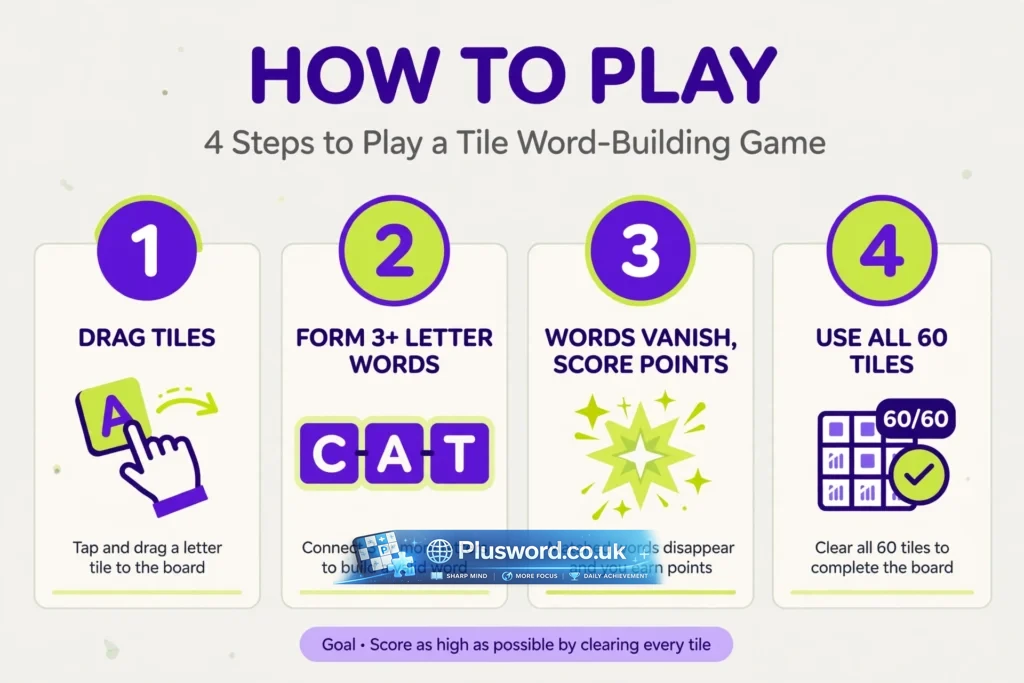
The rules take about thirty seconds to learn:
- Drag letter tiles from your tray onto any square of the grid.
- When at least 3 letters form a valid word (reading left-to-right or top-to-bottom), the letters light up — a wiggle animation shows a word is ready.
- The word vanishes and you earn points. New tiles keep coming until you have placed all 60.
- Plan ahead: letters you place stay on the board, so set up tiles to form longer words and crossing words for bonus points.
Rare letters like Z, Q, and X are worth more points, so building words around them pays off.
Daily Mode vs Practice Mode
Clickword offers two ways to play:
- Daily mode. Everyone gets the same set of letters each day, and you compete for the highest score. It adds a shared, competitive ritual — compare your score with friends, just like Wordle streaks.
- Practice mode. Play as often as you like with fresh random tiles and no pressure. Perfect for learning strategies and improving your word-building speed.
How Scoring Works
Points are awarded per word, based on the letters used — rarer letters score higher. Longer words earn more, and you get bonuses for clever placements, such as a single tile that completes two words at once (one horizontal, one vertical).
Because the tile count is fixed at 60, efficiency matters: a game of many short words scores less than a game where you engineer long, crossing words from the same tiles.
Tips for High Scores
- Think in longer words. Before placing tiles, look for 5–7 letter words you can build, not just quick 3-letter fillers.
- Build crossings. A tile that completes two words simultaneously is the highest-value move in the game.
- Save rare letters. Do not waste Z, Q, X, or J on tiny words — anchor a long word around them.
- Watch the wiggle. The game’s wiggle animation tells you a word is valid — use it to discover words you might not have spotted.
- Practice in practice mode. Experiment freely there, then bring your best strategies to the daily.
Clickword vs Other Word Games
- Vs Wordle: Wordle is one hidden word and six guesses; Clickword is open-ended building with 60 tiles. Clickword suits players who want a longer session.
- Vs Scrabble: similar tile-laying satisfaction, but Clickword is solo, faster, and words vanish as you score — no board to defend.
- Vs Squareword (same creator): both reward vocabulary, but Squareword is a guessing puzzle while Clickword is pure word construction.
Frequently Asked Questions
Is Clickword free to play?
Yes. Clickword is a free web game — no download, no account, and no payment required. Just open it in your browser and start dragging tiles.
Who created Clickword?
Clickword was created by the developer behind Squareword, the popular daily word-guessing game. It shares the same clean design philosophy and love of vocabulary.
How many letters do you get in Clickword?
Each game gives you 60 letter tiles. The game ends once all 60 have been placed, and your final score is the total points from every word you formed.
What is the daily mode in Clickword?
In daily mode, every player receives the same set of letters each day, so scores are directly comparable. It is the competitive heart of the game — solve the same puzzle as your friends and compare results.
Can I play Clickword on my phone?
Yes. Clickword runs in a web browser, so it works on phones, tablets, and desktops with no app install needed. The drag-and-drop controls are touch-friendly.
Final Thoughts
Clickword distils the joy of word games into its purest form: see letters, build words, score points. With 60 tiles, a daily challenge, and endless room for clever play, it is easy to learn and hard to put down.
If you enjoy daily word challenges, try our free daily Plusword puzzle — and check our guide to Parseword, another brilliant daily word game worth your morning coffee.